
AgentsDock
Home Docs FAQ Discord
  • English
  • 简体中文

Getting started

Setup guide Client install Connect agents Start your first chat

Guides

Feature guide Chat Agent-to-agent Share Chat Side chat Fork chat Resume chats Workspace Terminal access View & edit code Automation Slash commands Scheduled jobs Keyboard shortcuts Updates Language Manage your server

Help

Report an issue

Server reference

Advanced install Multiple servers Back up & uninstall

Feature guide / Chat

Fork any chat

Branch any chat with one click to try a new direction — the original stays intact.

Want to explore a different approach without losing your current thread? Fork the chat, and AgentsDock copies its full history into a new branch you can take anywhere — while the original stays exactly as it was. It's ideal for trying an alternative prompt, running an ablation, or testing a risky change side by side with the version that already works.
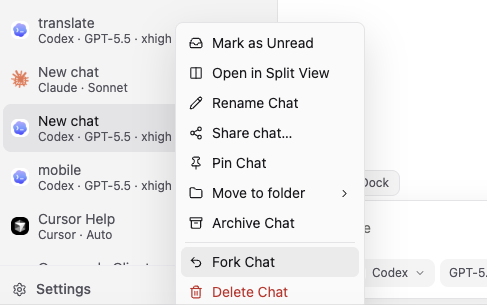
The chat context menu in the sidebar, with Fork Chat highlighted
Right-click a chat in the sidebar and choose Fork Chat.
Feature guide Previous: Side chat Next: Resume chats
AgentsDock

An IDE designed for agentic AI research.© 2026 AgentsDock

Docs Support Report an issue Privacy Discord ↗