
AgentsDock
Home Docs FAQ Discord
  • English
  • 简体中文

Getting started

Setup guide Client install Connect agents Start your first chat

Guides

Feature guide Chat Agent-to-agent Share Chat Side chat Fork chat Resume chats Workspace Terminal access View & edit code Automation Slash commands Scheduled jobs Keyboard shortcuts Updates Language Manage your server

Help

Report an issue

Server reference

Advanced install Multiple servers Back up & uninstall

Feature guide / Workspace

View and edit your code

Browse, preview, and edit files on your remote directly from the app.

The files you can open are the ones under the chat's working directory — the folder on your remote that this chat's agent works in. Set it when you create the chat, or change it anytime from the Session panel on the right.
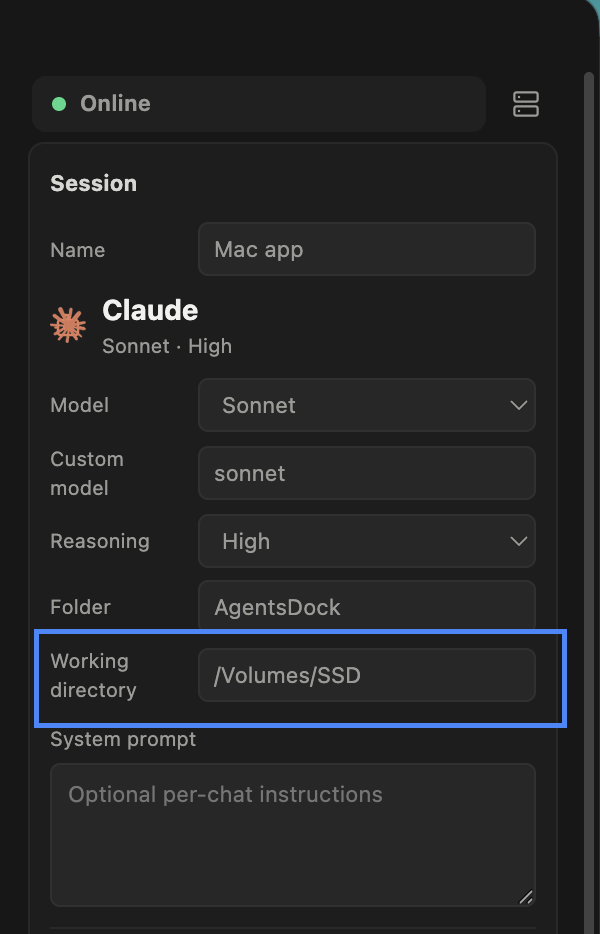
AgentsDock Session panel on the right, showing the chat's Working directory field
Find and change the chat's Working directory in the Session panel on the right.
Feature guide Previous: Terminal access Next: Slash commands
AgentsDock

An IDE designed for agentic AI research.© 2026 AgentsDock

Docs Support Report an issue Privacy Discord ↗